Rob Run Cheats
Rob Run cheats in one menu: aimbot and triggerbot, ESP on every player, car, camera, cash bag and base in Looty Bay, markers on the game's own map, no recoil, and battle mode on a single key. 249 controls, sold by the day.
What Rob Run cheats are, and what this one is
Rob Run cheats are third-party software that reads the game and shows you what it hides: where every player is and which side of the law they are on, who owns the car across the street, which cameras cover the bank and how far their cones reach, where the loot and the cash chargers are, and what state every base in the settlement is in. What this page sells is one menu for the Steam copy of the game, on Windows. It adds a humanised aimbot, a triggerbot, ESP on people, cars, cameras, loot, containers, grenades and bases, markers on the game's own map, warnings for police closing and for anyone aiming at you, no recoil, sway or spread, and a battle mode that clears the screen down to the parts a fight needs, on one key.
This Rob Run cheat does not teleport you, spawn cars or print money. Easy Anti-Cheat is real and runs at kernel level; this page prints no promise about it, only a build number and the day someone last checked. Prices for Rob Run cheats keys are a few sections down, and the whole control list is right below.
The Rob Run cheat, feature by feature
Nine families of control in these Rob Run cheats. Each is described from the menu, not from a feature list.
Rob Run aimbot with per-weapon profiles
Hold a key and the aim pulls to a bone of your choice on the nearest valid player. Pistols, rifles and everything else keep separate profiles, so a tight, slow setting for close work in a bank corridor does not bleed into the wide, fast one for the highway. Prediction leads moving targets, which matters against cars. The humaniser adds overshoot and settle so the pull reads as a flick, not a script, and a visible capture circle shows exactly what the aim will and will not take.
- Four weapon profiles, settings held separately for each
- Humaniser with a strength slider; smoothness and switch delay on top
- Target filters by role, dead, knocked, seated
- Bone choice or nearest-bone, Shift to head on demand
- Prediction with a second reticle at the impact point
- Adaptive FOV that tightens as targets close
- Memory or silent aim, with a bone randomiser and a head-hit percentage
A Rob Run triggerbot with its own weapon profiles
Separate from the aimbot and armed on its own key. Cross a target with the crosshair and it fires, with a reaction delay you set in milliseconds and a click-hold length that suits a semi-auto or a burst. Global, pistol, automatic and other weapons each carry their own copy of the tab. Pick which hitboxes count, head, body or legs, scale the box that counts as a crossing, and set it to visible targets only so it never fires into a wall. Cops, robbers, civilians and teammates are switched on or off one by one, and your own clan can be left out entirely.
- Four weapon classes: global, pistol, automatic, other
- Reaction delay and click-hold, both in your hands
- Hitboxes: head, body, legs, with a scale slider
- Visible only, so nothing is fired through geometry
- Target filters by role, plus dead, knocked, seated and clan
Rob Run ESP for police, robbers and civilians
Every player drawn through walls with a box or skeleton, name, clan tag, role, held item, armour, health, state and distance. The three roles each have their own copy of the settings: draw cops in one colour and scale, the crew you are hunting in another, civilians barely at all. Chams fill the model itself in a material you pick, green through neon and LED, coloured separately for police, robbers and everyone else. A blinking tag appears over anyone whose sights come onto you. Where the game publishes it, the label also carries what a player is doing, a countdown on the action, and the cargo and points they are carrying.
- Per-role settings: police, robbers, civilians drawn separately
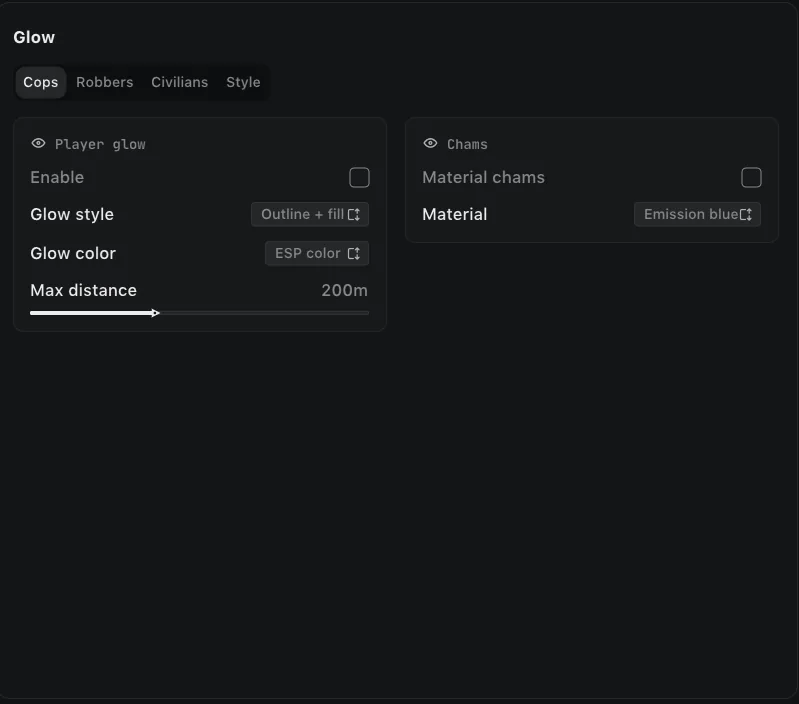
- Chams and glow in nine materials, coloured per role
- Aiming at you, a blinking tag the moment you are the target
- 2D or 3D boxes, corners or full, skeleton with head ring
- Labels for name, clan, role, armour, health, state, ID and a held-item icon
- Interaction and timers, with cargo and points when the game exposes them
Cars, cameras, NPCs and loot through walls
Vehicle ESP tags every car: owner, driver, speed, status, plus a shaded front face so you can read heading while it is parked, and a filter for whose cars you want to see at all, police, robbers, civilians or unowned, which carries over to the radar and the map. Camera ESP draws every security camera with the wedge it covers, in different colours for working, broken and alarmed: the edge of the cone is the line you walk behind. Loot carries its value on the label and a minimum-price filter hides anything not worth the walk, across eleven categories from ammo to valuables. Containers show whether they are locked, what opens them and what is inside. Security panels, safe doors, hide spots, player bags, vehicle trunks and dead players each get their own switch. The projectiles view draws a tracer along every round fired near you and the arc of a grenade before it lands, with its blast radius on the ground and the timer running.
- Vehicles: owner, driver, speed, status, heading, owner filter
- Cameras: view cone outline or fill, three state colours
- Loot priced on the label, with a minimum-value filter
- Containers: lock state, the item that opens it, and the contents
- Bullet tracers and grenade paths, with blast radius and timer
- Hide spots, player bags, vehicle trunks and dead players
Every base in the settlement, read from any distance
The Bases tab under World draws the whole settlement whether you are standing at the fence or across the map. Each plot carries its owner, clan, buildings and outbuildings, and whether it is locked, under construction or being moved. The raid picture is the part worth paying for: how many defence blocks are armed, which have modules installed, which buildings have already been raided, the raid lock timer and whether a VIP is on it, plus how many doors somebody left open. Workbenches show what they are, what is loaded and how long is left, from money laundering and cargo exchange to the crypto farm. Your own base and your clan's are drawn in colours of their own.
- Raid state: blocks armed, buildings raided, lock timer, VIP
- Defence blocks on the main building, wall and outbuildings
- Open doors counted, on your base and on theirs
- Workbenches with status, contents and timers
- Storages marked full or empty, with cargo left at the buildings
- Bases list: the whole settlement in one panel with distance and raid state
Rob Run radar, and markers on the game's own map
An overhead radar in the corner with range rings, a wedge showing where you are looking, and blips for whichever classes you switch on. The newer way round is the Game map tab, which draws the same markers straight onto the minimap and onto the full map under M, following it as you zoom and drag, so there is no second window to read. Players carry a stem for the direction they are facing, your crew gets its own colour, and anyone aiming at you turns red. Edge arrows point at players outside the frame, so the first warning of someone behind you is a marker, not a shot.
- Game map: markers on the minimap and the big map under M
- Look direction, names, outline and marker size
- Range rings and a view cone on the corner radar
- Rim pinning for anything past the edge, on both
- Entity filter: police, robbers, civilians, NPCs, vehicles, cameras
- Edge arrows with radius, size and range
Police closing, and whoever has you in their sights
The HUD tab is two warnings and the settings that place them. Police approaching tells you how many are coming, how far out they are, and gives you an arrow to the direction. Aiming at you names whoever has their sights on you and how far away they are. Both can appear as a panel in a corner of your choice or as a pop-up that clears itself. The third warning is the one that saves a base: leave a house door, a fence gate or a garage gate open and it says so, with the distance and an arrow home, and it runs whether or not the rest of the HUD is switched on.
- Police approaching: count, distance and a direction arrow
- Aiming at you: who it is and how far
- Base doors left open, with an arrow home
- Pop-ups or a fixed panel, with position, offset, scale and backing
No recoil, no sway, no spread
Three switches. With recoil off the muzzle stays on the first point of aim through a full magazine. With sway off the sights do not wander while you hold them. With spread off each round goes where the reticle is, not somewhere in a cone around it. Each is independent, so you can keep spread for the look of it and lose the climb.
- No recoil, no climb through a burst
- No sway while holding sights
- No spread, every round on the reticle
One key for a fight, one click for a setup
Battle mode is a single key that cuts the overlay back to skeletons and distances: dead bodies gone, radar and arrows hidden, labels compacted, the aimbot's capture circle gone with them, and whichever groups you choose removed entirely. Let go and it all comes back. The skin changer dresses your character on your screen only, which is worth saying twice: nobody else sees any of it. A free camera detaches from your body, and the cloud cover over Looty Bay is yours to set. Configurations save the whole menu as a named preset, so a quiet civilian setup and a loud robber setup are one click apart.
- Battle mode on a key, with an on-screen indicator
- Compact labels, hide dead, hide radar, hide arrows, hide groups
- Skin changer and a free camera, both client-side only
- Named configs: create, save, load, rename, delete
- Menu settings: keys, DPI, VSync, FPS cap, theme, layout, three languages
All 249 controls, tab by tab
Every Rob Run cheats control under the name the menu uses. If it is not on this list, the menu does not have it.




Rob Run cheat keys from $7.99
One day, one week or one month of Rob Run cheats. Same menu on every key.

Pick a key length
Every key opens the same 249-control menu. The only thing a longer key buys is more days. Prices in USD, EUR and GBP.
You confirm an email address with a six-digit code, the payment page opens, and the key plus loader arrive in that inbox once payment clears. No account is created.
- Windows 10 / 1164-bit only, Steam copy of Rob Run. No console build exists
- Three rolesSeparate ESP settings for police, robbers and civilians
- Three languagesEnglish menu; Russian and Chinese under Settings
- By email, any hourKey and loader sent within minutes of payment
Installing Rob Run cheats in three steps
From payment to the menu key in ten minutes if you read this first. Longer if you do not.
Confirm an email, pay
Type an address, enter the six-digit code it receives, and the payment page opens. Key and loader land in that inbox once payment clears.
Exclude the loader, open the game first
Put the loader on your antivirus exclusion list, Defender too, or it is removed on launch. Start Rob Run and wait at the title screen.
Loader as administrator, then the menu key
Launch the loader with administrator rights and enter the key. The menu opens on the key set under Settings; battle mode has its own.
Are Rob Run cheats safe with Easy Anti-Cheat?
Rob Run runs Easy Anti-Cheat at kernel level. It loads with the game, it has the privileges to inspect what else is running, and it reports to Kefir. Any page that calls a Rob Run cheat unbannable is describing its marketing. The honest version is this: the menu is external, it is rebuilt after each patch and tested on the live client, and the result is dated below. That reduces exposure. It does not remove it.
What you control matters as much. Running the humaniser instead of a zero-smoothness snap, switching on battle mode so a killcam shows a bare screen, not tracking people through three walls while a full lobby watches. A report from a player is still how most bans start.
What the account is worth to you is the real question. If losing it would hurt, do not run anything on it, this included. If it is a throwaway or a second account, the menu is maintained, dated, and refunds are read by a person. The terms say the same thing in fewer words.
Rob Run cheats build state and last check
Rob Run reached Steam Early Access on 4 November 2026 and the menu follows that client. Kefir patches often and without much notice, so this block answers the two questions worth asking before paying: what build the menu is on right now, and when someone last confirmed it works. As of the date above, no member has reported a detection to us. That is a dated observation, not a guarantee.
When a patch lands, the build comes down, is reworked against the new client, tested, and put back. The days it spends offline are added to every active key. If this block says the build is down, wait rather than buy blind.
Four updates landed through November. They added the Triggerbot tab, the Bases tab under World, the HUD warnings for police closing and for anyone aiming at you, the Game map markers, chams under Glow, and the Skin Changer. The control list below was rewritten against them on and now runs to 249 controls across 11 tabs.
Rob Run cheats, asked and answered
Are Rob Run cheats safe to use?
Not risk-free, and nobody honest will tell you otherwise. Rob Run runs Easy Anti-Cheat with kernel access, so a ban is possible. Two things change the odds: the build being current, which is checked daily and dated on this page, and how you play. A humaniser on the aimbot and battle mode on the overlay keep the screen from looking like a cheat in a clip. The rest is on you.
What does the menu run on?
A 64-bit install of Windows 10 or 11, plus the Steam copy of the game. There is no console version of Rob Run and none of this.
Which roles does it work for?
Every role. Police, robbers and civilians are configured separately in ESP, while aim, radar and battle mode behave the same whichever side you spawn on.
Does it have teleport, car spawning or money generation?
No. It covers aim, triggerbot, ESP, the map, the warnings and weapon handling, nothing else. Other shops list those three features for Rob Run; this build does not have them and this page will not pretend it does.
Does it have a triggerbot?
Yes, since the November build. It is a tab of its own, armed on its own key, with separate settings for global, pistol, automatic and other weapons. You choose the hitboxes, the reaction delay in milliseconds and how long the trigger is held, and you can restrict it to targets actually in view.
What does the bases tab show?
Every base in the settlement, from any distance. Owner and clan, whether it is locked, under construction or moving, how many defence blocks are armed and which buildings have been raided, the raid lock timer, how many doors are open, and what every workbench is running with its timer. There is also a list panel with the whole settlement sorted by distance.
How fast is delivery?
Minutes. You confirm an email with a code, pay, and the key and loader are sent to that address as soon as payment clears, day or night.
What happens when Kefir patches the game?
The menu goes offline until it is rebuilt against the new client and checked. Days lost to that are added to your key. The build state on this page says when it is back.
Can I get a refund?
Case by case, and a person reads each one. A key that never arrived, a build that was down for your whole one-day key, a menu that would not start after setup with support: yes. A ban, a change of mind, or a feature the menu never claimed: no. The refund policy spells it out.
Is there a free Rob Run cheat?
There are free externals on forums. They stop working at the first patch, bundle whatever their author chose to bundle, and get accounts banned faster than anything sold here. A paid, maintained menu with a dated build is the alternative, and it is what this page sells.
Support, by people who use the menu
One address. Write from the email you paid with and the order is found at once.
Setup problems, missing keys, refunds. Usually answered the same day.
Patch notices and the fastest place to ask a quick question. Nobody will DM you first asking for a key.
Rob Run cheats, sold by the day
One menu, every role. Pick a key length, confirm an email, and the loader is in your inbox before the next heist starts.
Pick a key length